 Santa Workshop
Christmas village game: decorate the village and run the North Pole in 2026
By Larisa Geanina Vizireanu, developer of Santa Workshop. Published . Updated .
Our top Christmas village game is Santa Workshop: Christmas Game, a free iPhone and iPad game from November 2026. You decorate the Christmas Village with floors, walls, string lights and trees, and you also run Santa's toy factory, reindeer stable and sleigh at the North Pole. Below: how to get started, how it compares, and how to build a real tabletop village with kids.
What people mean by a Christmas village game
The phrase covers a few different things. Some people want a game where they build a little snowy town. Some want to decorate: hang lights, place trees, make a place look warm. Others mean the North Pole itself, Santa's workshop and the stable out back. And plenty of people searching in November are really looking for a way to set up a real miniature village on the mantel.
This page covers the game side first, because that is what we make, then the real-table side with plain craft tips. If you only want the craft part, jump to the section on building a tabletop village.
What you can do in Santa Workshop's North Pole
Santa Workshop: Christmas Game is a free cozy game for iPhone and iPad. It is not a pure town builder. The North Pole is a set of places, and the Christmas Village is the one you decorate. The rest keeps the village busy.
The Christmas Village: decorate your way
This is the decorating part of the game. You choose floors, walls, string lights and Christmas trees. None of it is required to move forward; it is there for people who like making the place look nice. If you came for a "decorate Christmas village game," this is the screen you want, and it is only one piece of a bigger game.
We keep the facts short on purpose. The game lists floors, walls, lights and trees for the village, and we will not promise more than that.
Santa's Workshop: the toy factory
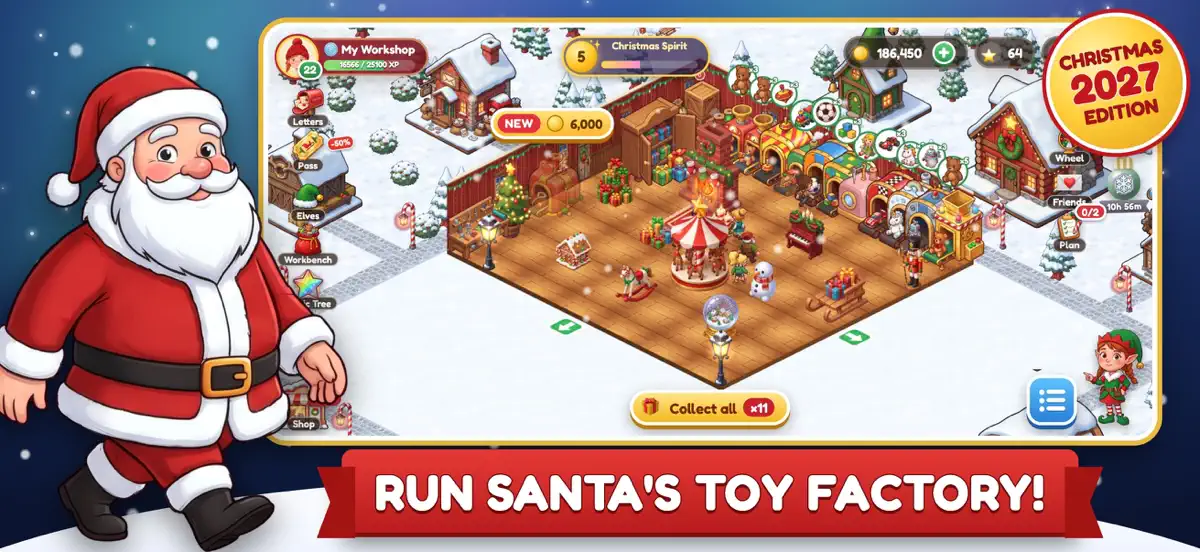
The workshop is home base. You place toy machines on the floor, and when a toy is ready a bubble appears above the machine. Tap it, or use the "Collect all" button. The first machines make teddy bears; later ones make toy trains, spinning tops, balls, dolls, race cars, robots, plush unicorns and a golden teddy. Upgrades make machines faster.
The factory keeps working while the game is closed. When you come back there is a "Welcome back" screen, and in one example it reports 2 hours and 1 minute away, with the elves still working and 38 toys made.
Elves, letters and the sleigh
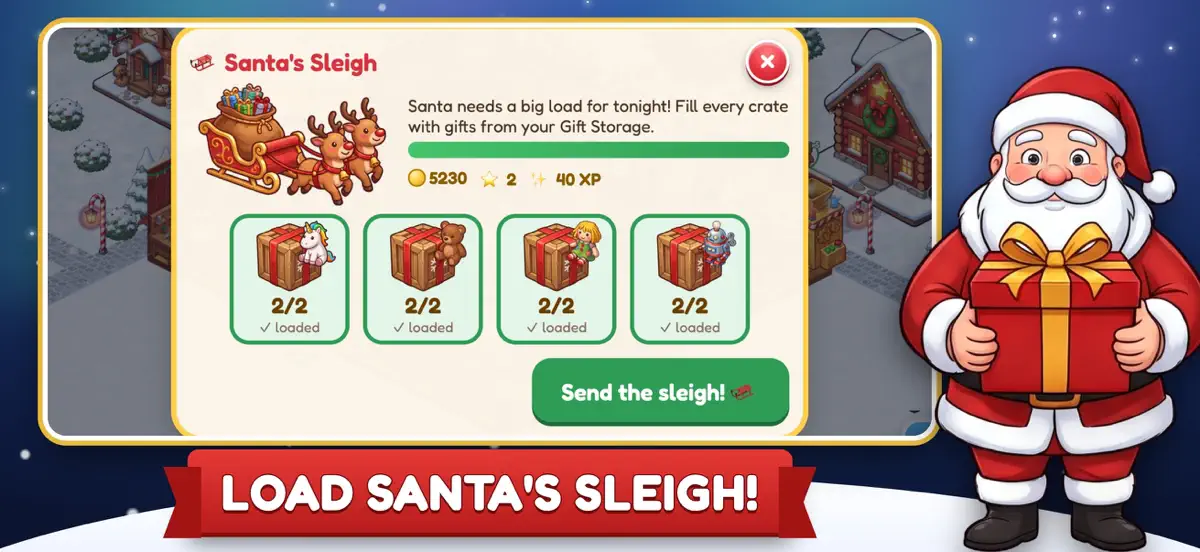
Each elf you hire boosts one machine by roughly 8% to 19% speed, and machines without an elf still work, only slower. Holly the elf guides you from the first minute. The toys go to children's letters (Chloe wants a toy train, Jack wants a spinning top, and his letter is marked URGENT with a timer) and into the gift crates on Santa's sleigh. Fill the crates from Gift Storage, press "Send the sleigh", and a full load pays coins, stars and XP.
The reindeer stable and the Snowy Forest
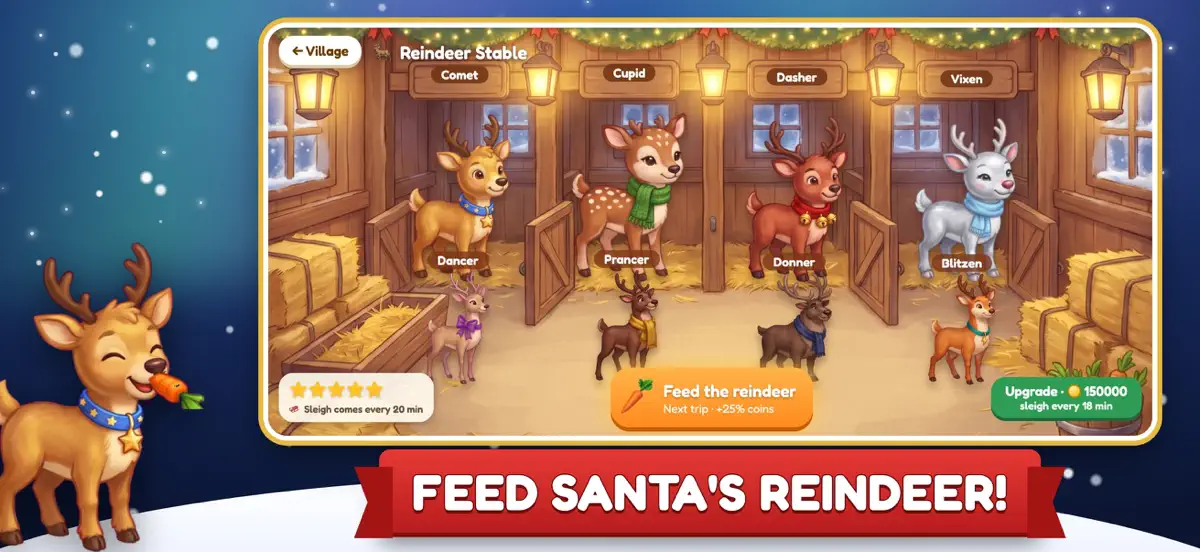
The Reindeer Stable holds Dasher, Dancer, Prancer, Vixen, Comet, Cupid, Donner and Blitzen. Feeding them speeds up the next sleigh trip, and upgrading the stable makes the sleigh come more often. The Snowy Forest hides gifts and a few animal friends.
Puzzle modes and daily extras
Two puzzle modes feed rewards back into the workshop: the Enchanted Tree, with hundreds of Christmas match 3 levels, and Santa's Workbench, a merge board where elves post orders. Each day there is an Advent calendar door, a free spin on the Lucky Wheel, a sticker album and a seasonal Golden Sleigh Pass. See the Christmas match 3 game page and the Christmas merge game page for how those play. For a screen-by-screen look at the rest of the North Pole, read the Santa games page.
Santa Workshop: Christmas Game
Free on iPhone and iPad. Android version coming soon.
How to get started: a simple first session
You do not need a plan. This order works well, and it takes only a few minutes.
- Follow Holly. The elf with the red pigtails guides you from the first minute, so just tap through.
- Place a machine and collect toys. Start with teddy bears. Tap the bubbles when toys are ready.
- Answer a letter. Make the toy the child asked for, press Send, and collect coins and stars. Watch for URGENT letters with a timer.
- Upgrade and hire an elf. Spend coins on machine upgrades, and put an elf on the machine you use most.
- Fill the sleigh. Load the crates from Gift Storage and press "Send the sleigh".
- Visit the Christmas Village. Pick floors, walls, lights and trees whenever you feel like it.
- Come back tomorrow. Open the Advent calendar door, take the free spin and collect the toys the elves made while you were away.
Nothing punishes you for skipping a day, so treat it like a small evening ritual rather than a chore.
Other Christmas village and town games
We only list games already covered with facts on our other pages, taken from App Store listings in November 2026. We did not play them for this page.
| Game | What it is | App Store details |
|---|---|---|
| Santa Workshop: Christmas Game | Toy factory, a Christmas Village to decorate, reindeer, sleigh, match 3 and merge | No ratings yet (released November 19, 2026); free; rated 4+ |
| Christmas Home Design Game | Play match 3 levels to earn stars, then decorate a holiday house room by room | 4.96 stars from 8,058 ratings; free; rated 4+ |
| Jingleworks: Santa's Workshop | Hand-painted North Pole village builder where named elves walk toys to the sleigh | 5.0 stars from 3 ratings; free; released November 6, 2026 |
The simple difference: Santa Workshop builds a toy factory and village, while Christmas Home Design Game decorates the rooms of a holiday home. Its listing promises winter and Christmas themes, seasonal events and offline play, and match 3 is the only way forward there. Jingleworks is the most direct rival if you want a village builder with no puzzle modes mixed in; with only 3 ratings, its 5.0 says little yet. More comparisons are on our cozy Christmas games page.
Build a real tabletop Christmas village with kids
A game is a good evening, but a real village on the sideboard is a different kind of fun. These are general craft tips, not tied to any product. Work in short sessions and let the kids make the decisions.
1. Start with a base
Use a sturdy board, a tray or a clear section of shelf. A sheet of plywood or a large piece of cardboard works. Cover it with white cotton batting, felt or a white sheet for snow, and tuck the edges under so it looks tidy. Tape the cover down on the underside so little hands can't pull it loose.
2. Make hills and paths
Slip books, boxes or crumpled paper under the snow cloth to make gentle hills. Lay a strip of grey felt or craft paper for a road, and use tissue paper or more batting for extra snow drifts. Skip anything loose and fine, like glitter or fake snow flakes, if there are toddlers or pets around.
3. Plan the layout before you place anything
Sketch the table on paper. Put tall pieces at the back, small ones at the front, and leave a clear "street" so the village has a center. Ask each child to choose one spot: the pond, the tree lot, the tiny train station. Kids who help plan stay interested longer.
4. Add lighting last, and keep it safe
Warm white string lights feel the most like a real winter evening. Battery-powered lights are the easiest choice for a kids' project because they need no cords. If you use plug-in lights, run the cord behind the display, keep it away from the edge, and unplug it when you leave the room. Read the manufacturer's instructions and limits before you connect anything.
5. Add small details
- Cotton balls or paper snowflakes on the roofs and trees.
- Toothpicks and paper for tiny signs and fences.
- Small figures, toy cars or animals from the toy box.
- A hand-drawn North Pole sign to tie it to Santa's workshop.
Rearranging is part of the fun. If kids want to move the lake every day, let them.
Honest limits of Santa Workshop
Santa Workshop is new, released November 19, 2026, so it has no App Store ratings or reviews yet. It is on iPhone and iPad; Android is coming soon to Google Play. The game is in English only, and progress is saved only on your device, so deleting the app deletes your village and workshop. It is free with optional purchases and some ads between games, and it plays offline. The village is one part of a larger game; if decorating is all you want, a dedicated decorating game may suit you better. To meet two of the stars of the North Pole, see reindeer games and elf games.
This page is written by the team that makes Santa Workshop. Details about other apps come from their App Store listings, checked in November 2026.
Frequently asked questions
What is a Christmas village game?
A Christmas village game lets you build or decorate a small holiday town, usually with lights, trees and snowy buildings. In Santa Workshop: Christmas Game the Christmas Village is the decorating part: you choose floors, walls, string lights and Christmas trees.
Can I decorate a Christmas village in Santa Workshop?
Yes. The Christmas Village in Santa Workshop lets you decorate with floors, walls, string lights and Christmas trees. Decorating is optional; nothing in the game requires it.
What is a North Pole game?
A North Pole game lets you run or explore Santa's home base. In Santa Workshop you place toy machines in the workshop, hire elves, answer children's letters, feed the eight reindeer and send Santa's sleigh.
Is there a Christmas town builder for iPhone?
Santa Workshop: Christmas Game builds a toy factory and a village you can decorate, and Christmas Home Design Game decorates the rooms of a holiday home. Jingleworks: Santa's Workshop is described as a North Pole village builder. We checked these listings in November 2026 and did not play them for this page.
Is Santa Workshop free and does it work offline?
Yes. Santa Workshop: Christmas Game is free with optional in-app purchases, needs no account and plays without an internet connection. Only ads and purchases need a connection. It is rated 4+.
Is there a Christmas village game for Android?
Not yet. Santa Workshop is out on iPhone and iPad now, and the Android version is coming soon to Google Play.
How do I start a real tabletop Christmas village?
Pick a table or shelf, cover a sturdy base with white batting or fabric for snow, hide cords behind the display, then place the tallest pieces at the back and add small lights and trees. Sketch the layout on paper first and let kids choose where each piece goes.
Santa Workshop: Christmas Game
Free on iPhone and iPad. Android version coming soon.
This page is written by the team that makes Santa Workshop. Store details checked November 2026.